

background: got a fairphone 5, stock android version 15 because of digital ID necessity or else i effectively lose citizenship (we gotta push back against this in the nordics but that’s sociology & bureaucracy so saving it for another thread)
i got: • zero amount of TikTok YouTube etc. apps • greyscale • brightness turnt down • screen usage tracker apps
here’s my screentime stats for this week
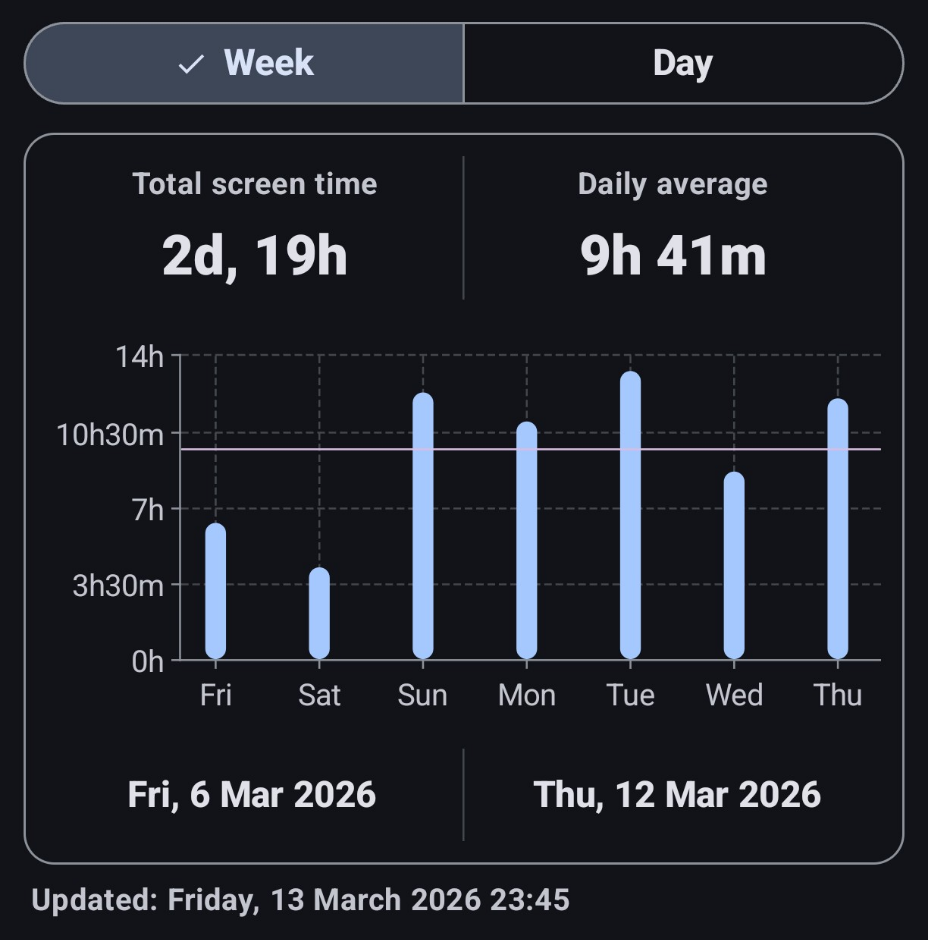
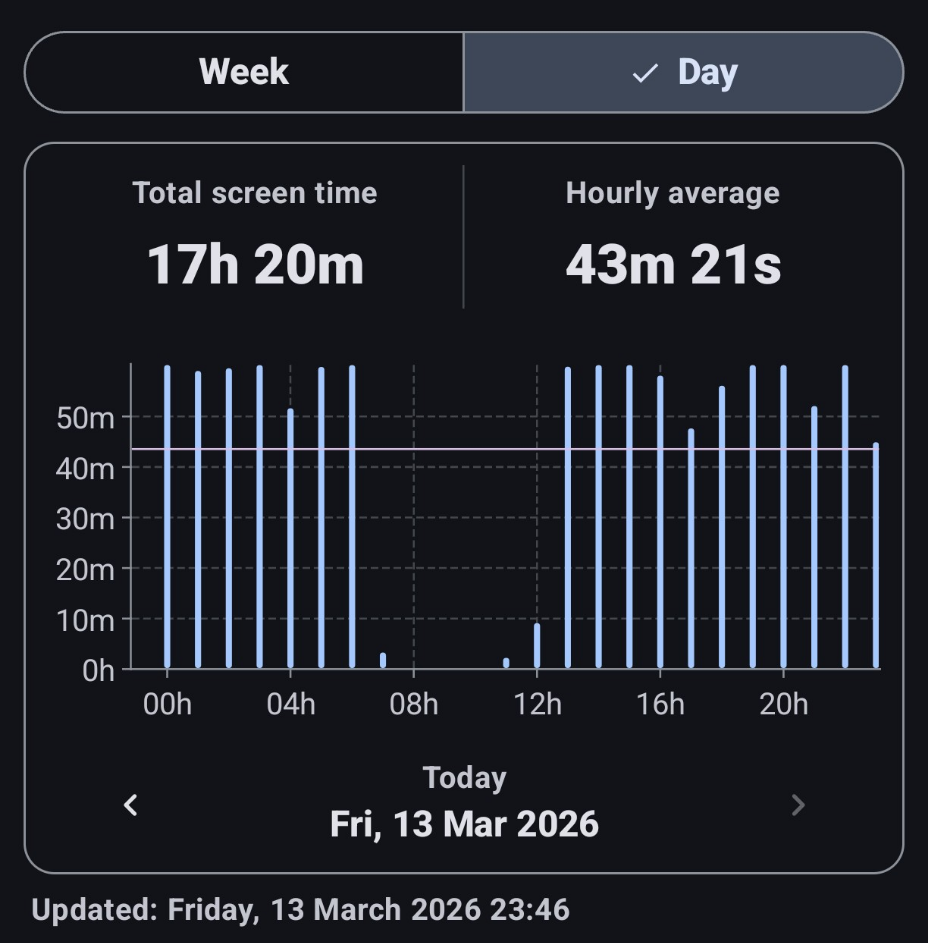
it’s literally all from ThreadiVerse (PieFed with Interstellar client), FLOS dating apps (Alovoa & Duolicious) + a regional non-free dating app forum suite and lastly reading manga watching porn…
i’ve never been this much bedrotting since i was a teen in the 2010s and not even then.
what i need is a way to enforce recommended guidelines that do exist for phone (ab)use: • that the phone shuts off after 2 hours of screentime per day. alternatively blank screen or just annoyance. • second-long breaks/timeouts every few minutes.
that is literally all. on a linux OS like PostMarketOS, SailFishOS, UbuntuTouch this is guaranteed doable, right? i can make the OS switch and appreciate insight into an operator implementing this in comments so that all can learn. it’s surely a meagre >=99 LoC shellscript source code to implement.
but on android? idk if that’s allowed or even possible to implement on stock android.
what are your thoughts? abhorring situation, all replies welcome. let’s keep it a constructive thread since this is a public health issue i wanna bring up in the open
Setting limits would help, but you’ll be left with time to spend off of your phone. While I can’t help with setting limits, I can recommend picking up a hobby that pulls you away from it. That can be anything from a sport to crochet. If you have something else you want to do instead, you may find yourself naturally using your device less.
opposite for me. if i have a phone or screen nearby i cease playing music instruments, excercise, cook food, woodwork, repair clothes, juggle, flip cardtricks, draw, read books, …
You seem to be in the perfect situation to justify screen limits then.
However, I can’t help with that sadly. I’m not on stock Android. It’s possible on my Samsung device through parental controls, so maybe look for something like that?
interesting with parental control settings and digital wellbeing as mentioned in another comment
Parental controls usually only require a password to unlock or bypass, so if you’re worried you’ll just unlock it yourself you may want to ask a trusted friend/ family/ partner to set the password for you.
yeah this version of android didn’t show up any parental settings with locks and stuff. does Android 15 just not have it like that?
It does, but being Google they pulled the more granular controls like screen time settings into a dedicated app: Google Family Link
In the settings, isn’t there a “digital wellbeing and parental controls” area? I’m pretty sure that’s a stock Android thing.
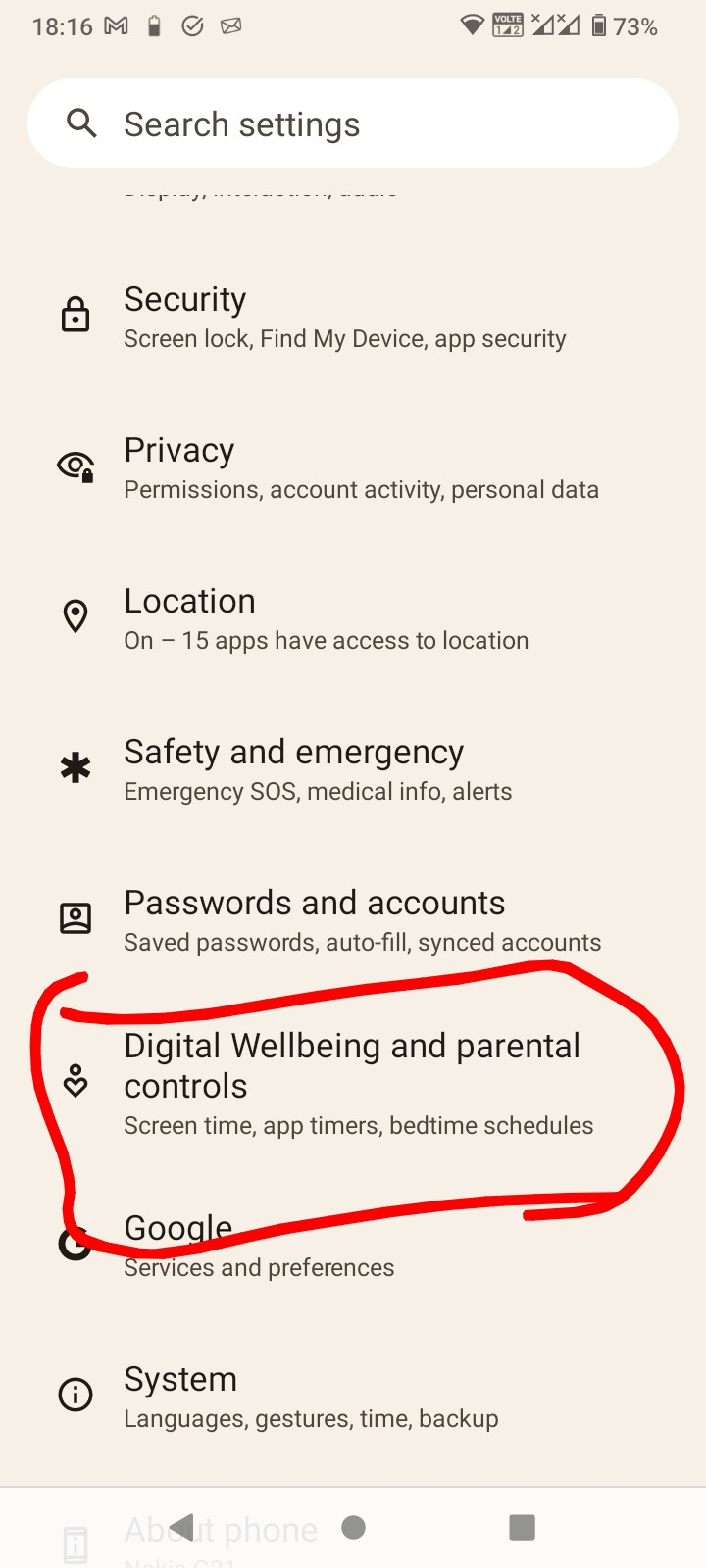
funny thing is i checked it yesterday put every app on block
today it’s 2-clicks with no wait time to un-block apps
I guess if it were effective then Google wouldn’t provide it.
There is an app called App Block which is a bit more hard to get around.
Perhaps the key is finding things to do that are better. Volunteer work, study, get a dog, etc
exactly my thought
I have this printed out and stuck to the fridge
https://ktarlow.com/littlebetterzine/littlebetterzine-sixty-things-singlepage.pdf
this is nice
The PieFed web UI has a daily limit you can set, btw. Doesn’t work with apps but you can uninstall all the apps and use PieFed as a pwa which is very app-y.
My thoughts: If you have the motivation and willpower to implement this system, then you’ve got MORE than enough willpower and motivation to cut down on your screentime without using a customized software solution.
In other words, just do it.
Set an alarm or timer on the phone. When it goes off, you pick a task from your to-do list and accomplish it. Maybe clean the house, go for a walk, attend to an errand. Be in the moment, listen to music, pause to ask how people are doing. Find a dog to pet.
Reconnect.
Then, go back to doom scrolling. But this time, instead of diving right in, make it a point to watch a video or read an article about something that interests you, something that you might enjoy doing yourself. Maybe it’s 3d printing, or flying drones, or welding. Something that is achievable, that you always wanted to do. You don’t have to take up this hobby - but maybe your new hobby is researching hobbies. Seeing what other things, besides staring at a screen, might capture your attention.
And, oops, there’s your alarm again! Has it been four hours already?! Time to do some stretching and pushups. Text a loved one. Hug a tree.
Etc, etc.
Your screentime is a lifestyle choice, and an addictive one. The solution is getting your brain’s pleasure center rewired.
buddy bootstraps
it’s nothing to do with willpower in the year-long run - that’s the rationalization of “they do it to themselves, beats me”
it’s all to do with the habits and compensations of unfulfilled life situations. unsatisfied life situations will lead to screen abuse like this. it’s adding weight on my autistic loner ass, no amount of going out to meet people and pet dogs and willpowering through habits changes the grooves of that river. i’ve reached out to have a psychologist to analyze this in the meantime since writing: they immediatly bring up acceptance for the issue and begin by (with me) breaking down the needs involved with my screentime.
• calendar • notebooks, quick-info, diary • creative outlet notebook
then the chats and porn and videogames which are a longer haul to breakdown.
none of this willpowering thru- just writing that down to anyone stuck believing the advice of “just pull yourself up by the bootstraps.”
thank you, i got irritated, but make this constructive
If you have someone close you can trust there is probably a way to add a kiosk mode to your app and let the friend keep the password to unlock it. It could have roles about what apps, websites etc are allowed and hours.
I did very little research in it to help my brother out but I didn’t get far. I got the feeling that it’s doable even on a locked bootloader. Sorry that I don’t have more info but maybe it can set you off on the right direction.
